Computer Worksheets
Computer Worksheets is a colorful and kid-friendly educational logo featuring a computer monitor, worksheet paper, pencil, keyboard, mouse, and books. The design represents digital learning, computer practice, education, and skill development. Its bright colors and playful style make it ideal for children’s computer worksheets, educational websites, printable worksheets, school resources, and learning materials.
Worksheets
Found 74 worksheet(s) — Page 2 of 4

Computer Mouse Worksheet in Hindi: Learn Mouse Parts
About the Computer Mouse Worksheet in Hindi Introduce young learners to the basics of technology with our colorful Computer Mouse Worksheet in Hindi. Designed specifically for elementary school students, this worksheet provides a comprehensive yet easy-to-understand introduction to the computer mouse, known as "माउस का परिचय". Through engaging diagrams and child-friendly Hindi text, children will easily grasp how this essential pointing device works. What Kids Will Learn Parts of a Mouse: Learn about the Left Button (लेफ्ट बटन), Right Button (राइट बटन), Scroll Wheel (स्क्रोल व्हील), and Mouse Body (माउस बॉडी). Types of Mice: Understand the differences between Mechanical, Optical, and Wireless mice. Functions & Uses: Discover how a mouse helps in controlling the cursor, opening files, scrolling pages, drawing, and playing games. Fun Facts: Did you know the computer mouse was invented by Douglas Engelbart in 1964? This worksheet covers interesting historical facts to spark curiosity. Interactive Learning Benefits Using visual aids is one of the most effective ways to teach young kids. This worksheet uses vibrant colors, cute illustrations, and clear labeling to make learning about computer hardware an enjoyable experience. It is perfect for classroom activities, homeschooling, or quick revision sessions for Grade 2 students to boost their digital literacy skills.

Computer Scanner Worksheet in Hindi - Learn Scanner Basics
About this Worksheet Introduce young learners to essential computer hardware with our interactive Computer Scanner Worksheet in Hindi. Designed specifically for elementary school students (Grade 3 to 5), this colourful worksheet provides a comprehensive introduction to scanners, explaining how they function as crucial input devices. With clear Hindi explanations and engaging visual aids, children will easily grasp how physical documents, photos, and drawings are converted into digital formats to be saved on a computer. What this Worksheet Covers This educational resource breaks down complex technical concepts into simple, easy-to-digest sections for young minds: Introduction to Scanners: Understands what a scanner is and how it acts as an input device. Working Process: A step-by-step visual guide showcasing how scanners place, light, capture, and send data. Types of Scanners: Introduces common types including Flatbed Scanners, Handheld Scanners, and Sheetfed Scanners. Uses of Scanners: Explores practical applications such as digital archiving, saving photos, emailing documents, and office record keeping. Important Facts: Key takeaways about DPI (Dots Per Inch), file formats like PDF, JPG, and PNG, and promoting a paperless office environment. Learning Benefits Enhances computer literacy and technical vocabulary in Hindi. Visual diagrams make complex technical processes easy to understand for Grade 3 kids. Encourages critical thinking about how daily technology works around us. Perfect resource for teachers and homeschooling parents looking for high-quality Hindi computer science worksheets.

Light Pen in Hindi: Computer Worksheet for Grade 3
लाइट पेन का परिचय - Introduction to Light Pen in Hindi क्या आप जानते हैं कि कंप्यूटर पर सीधे स्क्रीन को छूकर काम करने के लिए किस इनपुट डिवाइस का उपयोग किया जाता है? इस रंगीन और शैक्षिक Light Pen in Hindi वर्कशीट के माध्यम से बच्चे बहुत ही आसान भाषा में लाइट पेन के बारे में सब कुछ सीख सकते हैं। यह वर्कशीट विशेष रूप से प्राथमिक कक्षा (Grade 3) के छात्रों के लिए कंप्यूटर विज्ञान के बुनियादी सिद्धांतों को समझाने के लिए तैयार की गई है। इस वर्कशीट की मुख्य विशेषताएं (Key Features) लाइट पेन क्या है?: सरल शब्दों में परिभाषा कि यह एक पेन जैसा इनपुट डिवाइस है जिससे स्क्रीन पर सीधे विकल्पों को चुना जा सकता है। कार्यप्रणाली (Working Process): चित्रों के माध्यम से चरण-दर-चरण समझाया गया है कि लाइट पेन स्क्रीन की रोशनी को कैसे पहचानता है। लाइट पेन की विशेषताएं और उपयोग: ड्राइंग, ग्राफ़िक्स, एनिमेशन, इंजीनियरिंग (CAD), और शिक्षा के क्षेत्र में इसके उपयोगों की विस्तृत जानकारी। लाइट पेन और माउस में अंतर: एक सरल तुलनात्मक तालिका के माध्यम से दोनों इनपुट डिवाइसेस के बीच का अंतर स्पष्ट किया गया है। महत्वपूर्ण तथ्य: लाइट पेन के इतिहास, आविष्कार (1950 के दशक) और CRT स्क्रीन के साथ इसके संबंध के बारे में रोचक तथ्य। सीखने के लाभ (Learning Benefits) यह वर्कशीट बच्चों में विजुअल लर्निंग (Visual Learning) को बढ़ावा देती है। रंग-बिरंगे चित्रों और स्पष्ट हिंदी अनुवाद के साथ, छात्र कंप्यूटर विज्ञान के इस महत्वपूर्ण विषय को आसानी से समझ और याद रख सकते हैं। शिक्षकों और अभिभावकों के लिए यह वर्कशीट बच्चों को डिजिटल साक्षरता (Digital Literacy) की ओर ले जाने का एक शानदार और आकर्षक जरिया है।

Learn About Joystick: Hindi Computer Worksheet for Kids
About this Worksheet: Introduction to Joystick This colorful and engaging educational worksheet is designed to introduce young learners to the computer joystick in Hindi. Perfect for primary school students, this page provides a comprehensive yet easy-to-understand breakdown of how a joystick functions as an essential input device. Key Topics Covered What is a Joystick? (जॉयस्टिक क्या हैं?): Learn how this handle-like device controls movement in four directions. How It Works (जॉयस्टिक कैसे काम करता हैं?): A simple 3-step visual guide showing how movement signals are sent to the computer screen. Types of Joysticks (जॉयस्टिक के प्रकार): Discover the differences between Digital and Analog joysticks. Uses and Applications (जॉयस्टिक के उपयोग): Explore where joysticks are used, from video games and flight simulators to robotics and Virtual Reality (VR). Key Features & Facts (विशेषताएँ और महत्वपूर्ण तथ्य): Fun facts, including the history of the joystick from the 1960s and modern force feedback technology. Educational Benefits Bilingual Learning: Helps kids connect English technical terms with Hindi explanations. Visual Aids: Bright illustrations of joysticks, robots, and airplanes keep young minds engaged. Foundational Computer Skills: Introduces core hardware concepts like input devices in an approachable format.

Learn MICR OMR OCR in Hindi - Grade 4 Computer Worksheet
About this Worksheet This educational worksheet is designed to introduce young learners, particularly in Grade 4, to advanced computer input technologies: MICR, OMR, and OCR in Hindi. It provides a clear, visual, and easy-to-understand breakdown of how these specialized input devices read data and send it to computers. Written in accessible Hindi with helpful illustrations, it is perfect for classroom learning, computer lab activities, or home study. Key Concepts Covered The worksheet covers the fundamental aspects of these three vital data-reading technologies: MICR (Magnetic Ink Character Recognition): Explains how magnetic ink is used to read bank check details quickly and securely. OMR (Optical Mark Recognition): Details how pencil or pen marks are detected on test answer sheets and survey forms. OCR (Optical Character Recognition): Shows how printed text from scanned books and documents is converted into editable digital text. Comparison Table: A handy reference comparing the full names, reading capabilities, practical examples, and primary uses of all three technologies. Applications & Facts: Highlights real-world use cases in banking, education, and document management, along with interesting historical facts. Learning Benefits Using this worksheet, students will gain valuable technological literacy and academic skills: Understand the practical, real-world applications of computer science in everyday systems like banking and examinations. Enhance bilingual vocabulary with key technical terms explained in both Hindi and English. Improve comparative analytical skills through the structured differences table. Spark curiosity about digital scanning, automation, and modern data processing systems.

Barcode Reader Worksheet in Hindi | Computer Basics
About this Worksheet Introduce young learners to essential computer hardware concepts with our comprehensive Barcode Reader Worksheet in Hindi. Designed specifically for primary school students, this colorful and highly visual educational poster explains the fundamental concepts of barcode technology in easy-to-understand Hindi. It serves as an excellent resource for computer science classes, helping kids grasp how everyday technology works in supermarkets, libraries, and shipping centers. What You Will Learn This worksheet covers all the critical aspects of barcode readers, broken down into child-friendly sections: What is a Barcode Reader? (बारकोड रीडर क्या है?): An engaging introduction to this essential input device. How it Works: A step-by-step visual workflow from scanning to decoding and sending data to a computer. Types of Barcode Readers: Learn about Laser, CCD, and Imager barcode readers. Common Uses: Real-world applications in retail billing, inventory management, library records, and shipping. Types of Barcodes: Introduces standard barcode types like EAN, UPC, Code 39, and modern QR Codes. Learning Benefits Visual Learning: Vibrant diagrams and cute illustrations keep kids engaged and aid in information retention. Bilingual Understanding: Helps Hindi-medium students master technical computer terms with clear definitions. Practical Knowledge: Connects classroom computer science lessons with real-world technology they see daily. Perfect for Teachers and Parents Whether you are a school teacher looking for a classroom display chart or a parent homeschooling your child, this Barcode Reader Worksheet in Hindi is the perfect teaching aid. Download or print this resource to make learning about computer input devices interactive, fun, and highly educational!

Computer Output Devices Worksheet in Hindi | Grade 3
About this Worksheet Introduce young learners to the basics of computer hardware with our engaging computer output devices worksheet in hindi. Specifically tailored for Grade 3 students, this colorful educational resource simplifies complex computer concepts into easy-to-understand Hindi. It serves as an excellent teaching aid for both classroom instruction and home study, helping children build a strong foundation in computer literacy. Key Concepts Covered This comprehensive worksheet covers all the essential aspects of computer output systems: What are Output Devices?: Clear definitions explaining how devices display, print, or play the results of processed data. How They Function: A simple 4-step diagram showing the transition from input data, processing, output generation, to final display. Common Examples: Visual guides for key devices such as monitors, printers, speakers, projectors, headphones, and plotters. Real-World Uses: Practical examples of how we use these devices daily for entertainment, communication, and learning. Learning Benefits for Grade 3 Students Using this worksheet offers several educational advantages: Visual Reinforcement: High-quality illustrations help students associate terms with real-world objects. Bilingual Learning: Helps children learn technical computer terms in both Hindi and English. Critical Thinking: Encourages students to identify and categorize different hardware components based on their functions.

Learn Computer Monitor in Hindi: Types & Parts Guide
About this Computer Monitor Worksheet This beautifully designed educational worksheet introduces young learners to the Computer Monitor in Hindi (मॉनिटर का परिचय). Tailored for primary school students, particularly Grade 3, it simplifies complex computer hardware concepts into easy-to-understand visual sections. A monitor is an essential output device that displays processed data and information on the screen, and this chart covers all its fundamental aspects. Key Learning Topics Covered What is a Monitor? (मॉनिटर क्या है?): Understanding how it displays text, graphics, and video signals from the computer. How it Works (मॉनिटर कैसे काम करता है?): Step-by-step visual representation of data processing to screen display. Types of Monitors (मॉनिटर के प्रकार): Introduction to different screen technologies including CRT, LCD, LED, and OLED. Main Parts (मॉनिटर के मुख्य भाग): Identifying key components like the screen, bezel, power button, stand, and LED indicator. Features & Specifications (मॉनिटर की विशेषताएँ): Basics of screen size, resolution, brightness, contrast ratio, refresh rate, and energy efficiency. Learning Benefits for Kids Using visual aids like this worksheet helps students grasp computer science basics effortlessly. By studying the Computer Monitor in Hindi, children will: Develop a clear understanding of computer output devices. Learn to differentiate between older CRT monitors and modern OLED displays. Enhance their technical vocabulary in both Hindi and English. Build a strong foundation for elementary school computer science exams. Whether you are a teacher looking for classroom resources or a parent helping with homework, this comprehensive guide makes learning about computer hardware engaging and fun. Reference this chart to boost your child's digital literacy today!

Introduction to Printer Worksheet in Hindi | Computer Basics
About this Worksheet This educational worksheet is designed to help young learners understand the basics of a computer printer in Hindi (प्रिंटर का परिचय). It covers essential concepts suitable for primary school students (Grades 3 to 5) learning computer science basics in Hindi medium. With colorful illustrations and clear diagrams, this sheet simplifies complex hardware concepts for children. Key Learning Topics Covered प्रिंटर क्या है? (What is a Printer?): Understanding the printer as an essential output device that prints digital data onto paper. प्रिंटर कैसे काम करता है? (How Printers Work): A step-by-step visual process showing how data travels from a computer to the printed page. प्रिंटर के प्रकार (Types of Printers): Introduction to Impact (Dot Matrix) and Non-Impact (Inkjet, Laser, Thermal) printers. प्रिंटर के उपयोग (Uses of Printers): Practical applications of printing documents, photos, school assignments, and receipts. प्रिंटर के महत्वपूर्ण भाग (Parts of a Printer): Identifying key components like the control panel, paper tray, and ink/toner cartridges. Learning Benefits Enhances computer literacy and hardware vocabulary in Hindi. Visual diagrams make it easy for children to grasp technical concepts quickly. Includes interesting historical facts to boost curiosity about the evolution of technology. Perfect resource for teachers and parents looking for high-quality, engaging Hindi medium ICT worksheets.

Impact Printer in Hindi Worksheet for Kids | Grade 3 Computer
इम्पैक्ट प्रिंटर (Impact Printer) Worksheet for Kids Introduce your primary school students to the fundamental concepts of computer hardware with this engaging and colorful Impact Printer in Hindi Worksheet. Specially designed for Grade 3 and elementary students, this educational resource simplifies complex computer concepts into easy-to-understand Hindi text accompanied by vibrant illustrations. What is an Impact Printer? (इम्पैक्ट प्रिंटर क्या है?) An impact printer is a type of printer that operates by direct contact of an ink ribbon with paper. This worksheet beautifully explains the mechanism: "इम्पैक्ट प्रिंटर एक ऐसा प्रिंटर होता है, जो छापने के लिए रिबन पर लगे छोटे-छोटे पिन (सुई) को कागज़ पर ज़ोर से मारता है, जिससे अक्षर या चित्र छप जाते हैं।" Key Features & Learning Benefits This comprehensive worksheet covers everything a young learner needs to know about impact printers, including: Working Mechanism (कार्य करने की विधि): Step-by-step visual diagram showing how data travels from the computer to activate the print head pins to strike the paper. Types of Impact Printers: Introduces children to Dot Matrix Printers (डॉट मैट्रिक्स प्रिंटर) and Daisy Wheel Printers (डेज़ी व्हील प्रिंटर) with clear diagrams. Pros & Cons (फायदे और नुकसान): Explains the advantages like durability and carbon copy capability, alongside limitations like noise, slower speed, and lack of color printing. Real-world Applications (उपयोग): Helps children learn where these printers are used today, such as banks, railways, billing systems, and government offices. Why Choose This Worksheet? Learning computer science in one's native language helps build stronger foundational concepts. This worksheet is perfect for classroom activities, homework assignments, or homeschooling. It encourages critical thinking by comparing different printer types and understanding their practical uses in everyday life.
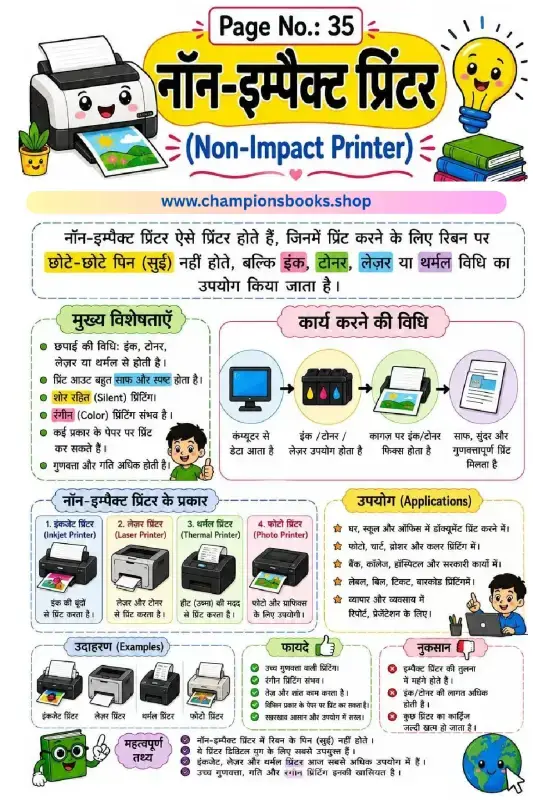
Non-Impact Printer Worksheet in Hindi | Grade 4 Computer
About this Non-Impact Printer Worksheet in Hindi This colorful and engaging Non-Impact Printer Worksheet in Hindi is designed for Grade 4 students to help them understand basic computer hardware concepts. It provides a comprehensive overview of non-impact printers, their working mechanisms, types, and real-world applications in simple, easy-to-understand Hindi with clear visual aids. What is a Non-Impact Printer? A non-impact printer is a modern type of printer that does not hit or impact a ribbon to print on paper. Instead, it uses advanced technologies like laser beams, electrostatic charges, inkjet sprays, or heat to produce high-quality text and graphics silently and quickly. This worksheet explains these complex concepts using relatable daily-life examples. Learning Benefits Understand Printer Technology: Learn how non-impact printers use ink, toner, laser, or thermal methods instead of traditional ribbons. Explore Different Types: Discover the four main types of non-impact printers: Inkjet Printer, Laser Printer, Thermal Printer, and Photo Printer. Learn the Working Process: Step-by-step visual representation of how data from a computer is converted into high-quality prints. Pros and Cons: Understand the advantages (high quality, silent printing) and disadvantages (cost of ink/cartridges) of using these devices. How to Use This Worksheet This worksheet is an excellent resource for computer science teachers and homeschooling parents. You can use it to introduce the topic of computer output devices, conduct interactive classroom discussions, or as a handy revision guide. The visual flowcharts and colorful illustrations make complex technical concepts highly accessible for young learners.

Plotter in Hindi: Computer Output Device Worksheet
About this Plotter (प्लॉटर) Worksheet This educational worksheet is designed to help students understand the Plotter (प्लॉटर), a crucial computer output device used for printing high-quality, large-scale graphics, architectural designs, and maps. Written in clear and accessible Hindi, this resource is perfect for elementary and middle school students learning basic computer hardware concepts. Key Features of a Plotter The worksheet comprehensively covers the essential characteristics of a plotter, making it easy for young learners to grasp: High-Quality Output: Explains how plotters provide exceptional accuracy and precision for large prints (A1, A0, A0+). Vector Graphics: Highlights why plotters are ideal for CAD, CAM, GIS, engineering, and architectural designs. Pen-Based Drawing: Illustrates how plotters use ink pens or plotters to create drawings instead of standard toner. Types and Applications Covered Students will explore different types of plotters and their real-world applications through clear diagrams and flowcharts: Flatbed Plotter: Draws on flat paper placed on a bed. Drum Plotter: Prints on paper wrapped around a rotating drum. Cutting Plotter: Specifically designed for cutting vinyl and other materials. Common Uses: Engineering blueprints, GIS mapping, fashion design, and large banner printing. Learning Benefits By studying this visual worksheet, students will not only learn the definition of a plotter but also its advantages, limitations, and real-world examples like HP DesignJet and Canon imagePROGRAF. It serves as an excellent study guide for school computer exams and general knowledge quizzes.
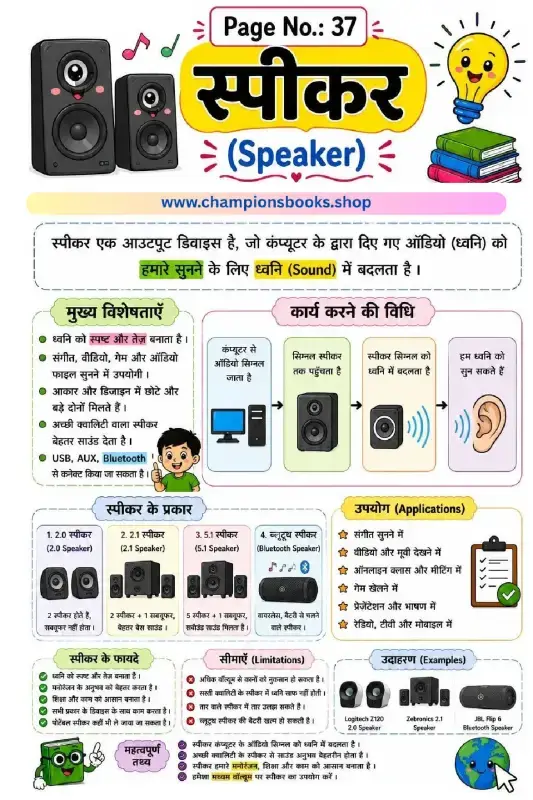
Speaker Computer Output Device Worksheet | Grade 3 Computer
About this Worksheet Introduce young learners to the world of computer hardware with our interactive Speaker Computer Output Device Worksheet. Tailored for Grade 3 students, this colorful study guide explains the concept of speakers in both Hindi and English. It helps children understand how a speaker converts digital audio signals from a computer into sound that we can easily hear. Key Topics Covered Definition of Speaker: Learn why a speaker is classified as an essential output device. How it Works (कार्य करने की विधि): Step-by-step visual representation of how audio signals travel from the computer to our ears. Types of Speakers: Understand different configurations including 2.0, 2.1, 5.1, and Bluetooth speakers. Applications & Uses: Real-world uses of speakers in online classes, gaming, music, and presentations. Pros & Cons: Explores the advantages (clear sound, portability) and limitations (hearing safety with high volume). Learning Benefits This worksheet is an excellent resource for parents and teachers to simplify computer science concepts. By studying this sheet, students will: Easily identify different types of sound output devices. Enhance their bilingual vocabulary (Hindi and English) for computer parts. Develop a foundational understanding of how computer peripherals function together. How to Use This Worksheet This worksheet serves as a perfect visual aid for classroom teaching or home revision. Teachers can use it to initiate a classroom discussion about input versus output devices. Parents can print this guide to help children review important facts about volume safety and audio technology. With clear diagrams and child-friendly language, mastering computer basics has never been more fun!

Projector Output Device Worksheet for Kids | Computer Basics
About this Projector Output Device Worksheet Introduce young learners to the world of computer hardware with our comprehensive projector output device worksheet. This beautifully designed bilingual (Hindi and English) educational chart is perfect for helping primary school students understand how a projector works, its key functions, and its role as an essential output device. With colorful illustrations and clear, easy-to-follow flowcharts, this worksheet makes learning computer science concepts both fun and highly interactive. Key Learning Benefits By studying this visual learning guide, students will grasp fundamental computer hardware concepts easily. Here are the core benefits of using this worksheet: Clear Concept Definition: Understand what a projector is and how it displays images, videos, and presentations onto a large screen. Step-by-Step Working Process: Visualizes the complete mechanism from data input, processing, lens projection, to the final screen display. Types of Projectors: Introduces kids to modern projection technologies including LCD, DLP, LED, and Laser projectors. Real-World Applications: Showcases practical uses in classrooms, business meetings, home theaters, events, and gaming setups. Hardware Connections: Learn about essential input and output ports such as HDMI, VGA, USB, Audio, and LAN ports. How to Use This Worksheet Teachers and parents can use this sheet as an anchor chart, study guide, or a classroom poster. Encourage students to identify different projector types, discuss their advantages, and practice labeling the connection ports. This is an excellent, engaging resource for elementary computer science lessons and fast-track revision before exams.

Computer Memory in Hindi Worksheet for Grade 3 Students
Introduction to Computer Memory in Hindi Introduce young learners to the fundamental concepts of computer storage with our highly engaging computer memory in hindi worksheet. Designed specifically for Grade 3 students, this colorful educational chart simplifies complex hardware concepts into easy-to-understand Hindi and English explanations. It serves as an excellent resource for parents and teachers to introduce elementary computer science concepts. What this Worksheet Covers This comprehensive worksheet provides a structured breakdown of how computers store and process data: Definition of Memory: Learn how a computer stores data, instructions, and information either temporarily or permanently. Primary Memory (प्राइमरी मेमोरी): Clear explanations of RAM (Random Access Memory), ROM (Read Only Memory), and high-speed Cache Memory. Secondary Memory (सेकेंडरी मेमोरी): Introduction to external storage devices like Hard Disks, SSDs, Pen Drives, CDs/DVDs, and Memory Cards. Key Features & Applications: Visual examples of how memory helps increase computer speed, run operating systems, and safely store files. Key Learning Benefits Using this visual guide, students will develop essential digital literacy skills: Understand the core difference between volatile (temporary) and non-volatile (permanent) storage. Identify physical computer components through clear, labeled illustrations. Grasp basic computer terminology in both Hindi and English, boosting bilingual vocabulary. Enhance critical thinking regarding how everyday devices like smartphones and laptops save information. Perfect for classroom displays, homework support, or self-paced study, this computer memory in hindi worksheet makes learning IT fundamentals fun, visual, and highly accessible for young minds!

Interactive Computer RAM Worksheet in Hindi for Grade 4
About this Computer RAM Worksheet in Hindi Introduce young learners to the core concepts of computer hardware with our engaging Computer RAM Worksheet in Hindi. Designed specifically for Grade 4 students, this colorful study guide simplifies complex computer science topics like primary memory and temporary data storage using easy-to-understand Hindi explanations and vibrant illustrations. What Students Will Learn This comprehensive worksheet covers all the essential aspects of Random Access Memory (RAM), helping students build a strong foundation in computer literacy: What is RAM? Learn that RAM is the primary, volatile memory of a computer that stores data temporarily. Key Features of RAM: Understand how speed is measured in nanoseconds and why data disappears when the computer is turned off. Types of RAM: Explore the evolution of memory from older SDRAM to modern DDR4 and DDR5 technologies. RAM Capacities: Discover how different sizes (like 2GB, 4GB, 8GB, and 16GB) are used for tasks ranging from basic browsing to high-end gaming. How RAM Works: Follow the step-by-step cycle from CPU input to active processing and temporary storage. Benefits of Visual Learning Using visual aids like this worksheet makes learning computer hardware fun and memorable. Students can easily grasp the concept of RAM being the computer's "working table," helping them retain crucial information for their exams and practical computer usage.

ROM का परिचय: Learn Read Only Memory Computer Worksheet
About this Worksheet This educational worksheet, titled "ROM का परिचय" (Introduction to ROM), is designed to help Grade 4 students understand the fundamentals of computer memory. Written in clear Hindi with easy-to-understand diagrams, this worksheet introduces children to Read Only Memory (ROM), its features, types, and how it differs from RAM. Learning Benefits Using this worksheet, students will explore essential computer science concepts through engaging visuals and structured tables. Key learning benefits include: Understanding ROM: Learn why ROM is a non-volatile memory that retains data even when the computer is turned off. Types of ROM: Discover the four main types of ROM, including Mask ROM, PROM, EPROM, and EEPROM. RAM vs. ROM: A clear comparative table helps kids easily distinguish between Random Access Memory and Read Only Memory based on speed, nature, and usage. How ROM Works: Visual step-by-step flow showing how the CPU reads startup instructions (like BIOS) from ROM to boot the operating system. Real-world Applications: Learn how ROM is used in everyday devices like mobiles, routers, and microcontrollers. Why Use This Worksheet? Perfect for elementary school classrooms and homeschooling, this ROM का परिचय worksheet simplifies complex technical jargon into bite-sized Hindi explanations. Interactive elements like the "Important Facts" (महत्वपूर्ण तथ्य) section reinforce memory retention and make computer science fun and accessible for young learners.
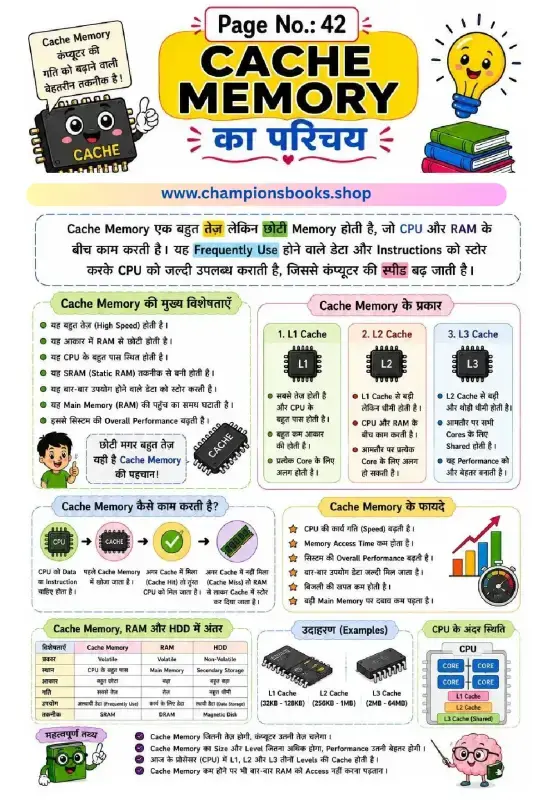
Cache Memory in Hindi: Types, Working & Features Guide
This educational infographic is designed to help Grade 6 students easily understand the concept of Cache Memory in Hindi. Cache memory is a small, high-speed volatile computer memory that provides high-speed data access to a computer's CPU and stores frequently used program instructions. About this Worksheet This colorful and engaging visual guide explains the fundamentals of computer memory architecture. It breaks down complex technical jargon into simple, student-friendly Hindi and English terms. It is perfect for classroom learning, computer science exams, and self-study. Key Learning Benefits Clear Definition: Understand what cache memory is and why it acts as a bridge between the CPU and RAM. Types of Cache: Learn about the three main levels of cache memory: L1 Cache, L2 Cache, and L3 Cache. Working Mechanism: Step-by-step visual representation of Cache Hit vs. Cache Miss. Comparative Study: A detailed comparison table highlighting differences between Cache Memory, RAM, and HDD based on speed, size, and cost. Advantages: Discover how cache memory reduces access time, decreases power consumption, and boosts overall system performance. Why Use This Guide? Visual learning helps students retain computer hardware concepts much faster. With clear illustrations of CPU architectures, memory chips, and easy-to-follow flowcharts, this resource makes learning about computer memory fun and highly effective for young learners.
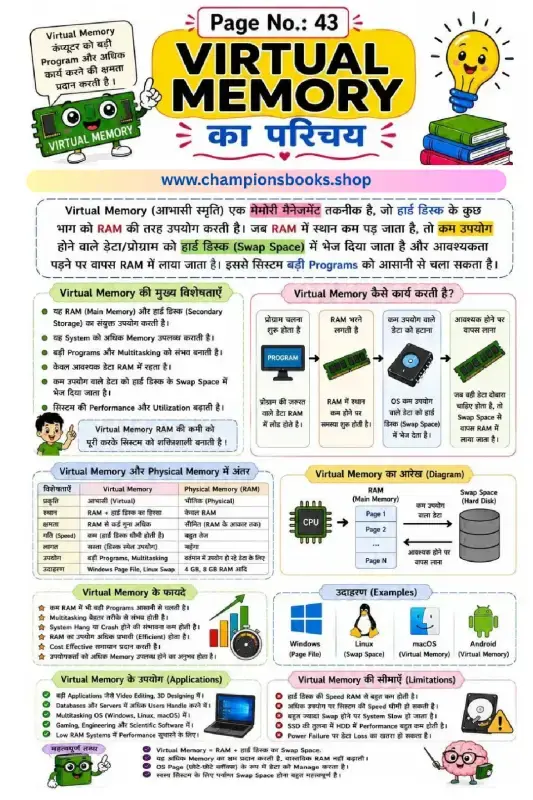
Virtual Memory Computer Worksheet in Hindi | Grade 6 ICT
Introduce Students to Virtual Memory Concepts Help your Grade 6 students grasp the essential concepts of computer science with this engaging, colorful Virtual Memory Computer Worksheet in Hindi. Designed specifically for young learners, this educational poster simplifies complex technical ideas like RAM management, swap space, and physical storage into easy-to-understand visual guides. What This Worksheet Covers This comprehensive study guide is packed with visual aids and clear explanations, making it perfect for classroom teaching or home study. Key topics include: Definition of Virtual Memory: An easy-to-understand explanation of how the operating system uses hard disk space as temporary RAM. Step-by-Step Workflow: A clear diagram showing how data moves from RAM to Swap Space and back when memory runs low. Comparison Table: A detailed breakdown of the differences between Virtual Memory and Physical Memory (RAM) in terms of speed, cost, and capacity. Benefits & Limitations: Honest insights into how virtual memory aids multitasking while highlighting its impact on system speed. Real-World Examples: Familiar operating systems like Windows (Page File), Linux (Swap Space), and macOS. Learning Benefits for Grade 6 Students Visual Learning: Bright illustrations and diagrams keep students engaged and improve retention of technical concepts. Bilingual Support: Technical terms are provided in both English and Hindi, helping students bridge language gaps in computer science. Critical Thinking: Encourages students to understand how hardware and software collaborate to run heavy applications efficiently.
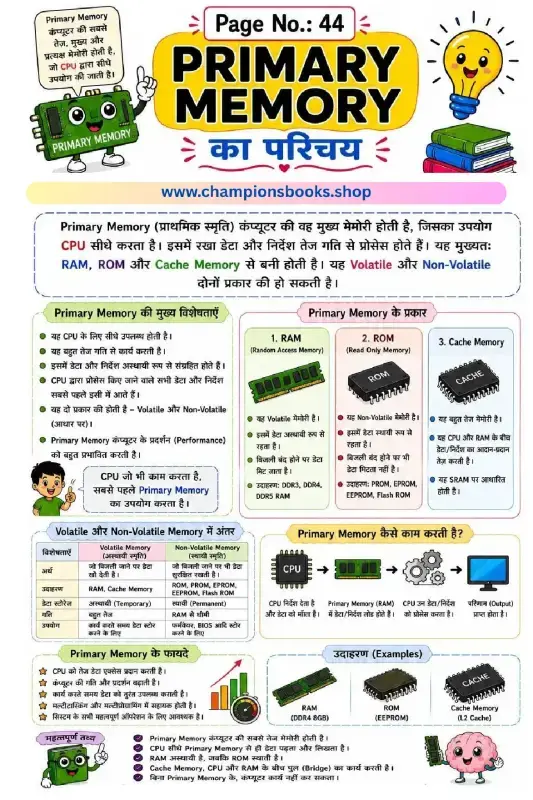
Computer Primary Memory Worksheet in Hindi | Grade 4
About this Computer Primary Memory Worksheet Introduce young learners to the core concepts of computer science with our engaging computer primary memory worksheet designed specifically for Grade 4 students. This bilingual worksheet, written in both Hindi and English, provides a clear and comprehensive introduction to Primary Memory (प्राथमिक स्मृति). It breaks down complex technical terms into easy-to-understand concepts, making it the perfect resource for classroom learning or home study. What Students Will Learn Introduction to Primary Memory: Understand why primary memory is the fastest and main memory directly accessed by the CPU. Types of Primary Memory: Learn about RAM (Random Access Memory), ROM (Read Only Memory), and high-speed Cache Memory. Volatile vs. Non-Volatile: Discover the key differences between temporary (volatile) and permanent (non-volatile) storage. How Memory Works: Follow the step-by-step visual diagram showing how the CPU processes instructions using primary memory. Real-world Examples: Identify common examples like DDR4 RAM, EEPROM, and L2 Cache. Benefits of this Worksheet This worksheet is carefully structured to enhance critical thinking and computer literacy in young minds. By using vivid illustrations, structured comparison tables, and simplified explanations, it helps students grasp the fundamental building blocks of how computers process and store data. It is an excellent tool for teachers and parents looking to reinforce basic computer science curricula. Whether preparing for a school test or simply exploring technology, kids will benefit immensely from the easy-to-read layout and interactive visual guides included in this printable study sheet.

Secondary Memory Worksheet: Learn Computer Basics
About this Secondary Memory Worksheet Introduce young learners to the fundamental concepts of computer science with our colorful and engaging Secondary Memory Worksheet. Designed primarily in Hindi with English terminology, this educational chart makes it easy for elementary students to grasp the basics of non-volatile computer storage. It serves as an excellent visual aid for both classroom teaching and home study sessions, helping kids connect real-world storage devices with computer science concepts. Key Learning Benefits This worksheet helps students understand how computers store information permanently. By studying this resource, children will learn: Definition of Secondary Memory: Understand that secondary memory is non-volatile (गैर-वाष्पशील) and safely retains data even when the computer is turned off. Types of Storage Devices: Identify and name common storage devices such as Hard Disks, Solid State Drives (SSD), Pen Drives, CDs, DVDs, and Memory Cards. Key Characteristics: Learn about storage capacity, speed differences compared to the CPU, and the cost-effectiveness of secondary storage. Primary vs. Secondary Memory: Compare critical differences like volatility, speed, and capacity between primary memory (RAM/ROM) and secondary storage devices. How to Use This Worksheet Teachers and parents can use this Secondary Memory Worksheet to introduce basic computer hardware concepts. You can use the colorful illustrations to quiz students on different storage devices, ask them to identify devices they use at home, or have them write down the main differences between primary and secondary memory based on the handy comparison table provided. It is a perfect resource for Grade 3 to Grade 5 computer science curriculums.

Learn Computer Hard Disk in Hindi - Free Kids Worksheet
About this Computer Hard Disk Worksheet This educational poster about the computer hard disk in Hindi is a fantastic resource for young students to understand how computer storage works. Designed with colorful illustrations and simple Hindi text, it makes complex computer science concepts highly accessible for primary school learners. Key Topics Covered Definition of Hard Disk: Introduces the concept of non-volatile (permanent) storage devices. Main Parts: Explains key internal components including the Platter, Spindle Motor, Read/Write Head, Actuator Arm, and Connector. HDD vs. SSD: A clear side-by-side comparison of Hard Disk Drives (magnetic) and Solid State Drives (flash memory). Features and Uses: Outlines why we use hard disks, such as installing operating systems, saving multimedia files, and creating data backups. Learning Benefits Bilingual Understanding: Helps kids connect English computer terminology with clear Hindi explanations. Visual Learning: Detailed diagrams of open hard drives help children visualize how computer hardware operates internally. Curriculum Aligned: Perfect for Grade 3 to Grade 5 computer applications and general science classes.
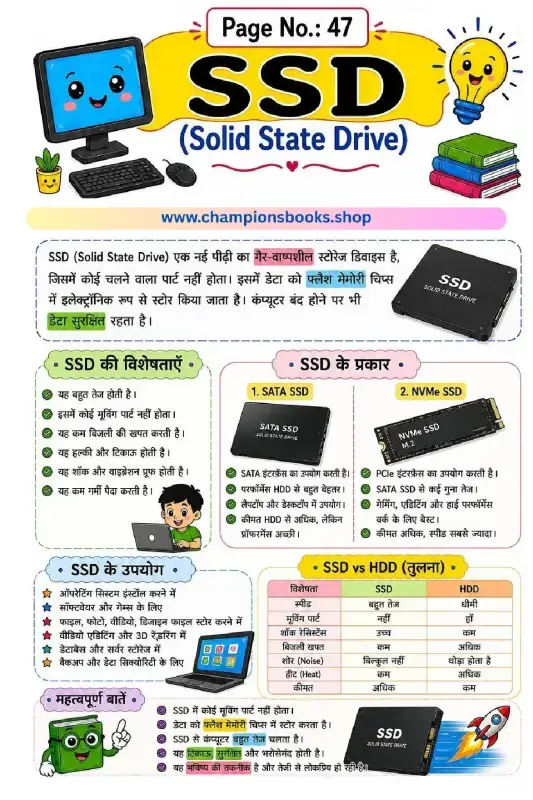
SSD Computer Worksheet in Hindi: Learn Solid State Drive
About this SSD Computer Worksheet in Hindi Introduce young learners to modern computer hardware with our engaging SSD (Solid State Drive) computer worksheet in Hindi. Designed specifically for primary school students (Grade 3 to 5), this visually rich educational resource explains the fundamental concepts of computer storage in an easy-to-understand format. Key Learning Topics Covered This worksheet breaks down complex computer science concepts into simple, digestible sections: What is an SSD? Learn how Solid State Drives use non-volatile flash memory chips to store data securely without any moving parts. Key Features of SSDs: Discover why SSDs are fast, lightweight, durable, shockproof, and energy-efficient. Types of SSDs: Understand the differences between standard SATA SSDs and high-performance NVMe SSDs. SSD vs HDD Comparison: A clear, structured table comparing speed, noise, power consumption, heat, and cost between traditional Hard Disk Drives and modern Solid State Drives. Practical Applications: Learn where SSDs are used, including operating system installation, gaming, video editing, and secure data backups. Why Use This Worksheet? Visual Learning: Colorful illustrations of computers, laptops, and SSD components keep students engaged. Bilingual Approach: Explanations are written in clear Hindi with key technical terms highlighted to build strong computer vocabulary. Perfect for Classrooms & Home Study: Ideal for elementary computer science teachers, homeschooling parents, and tech-curious kids.

Learn CD and DVD Storage Devices - Computer Worksheet
About this CD and DVD Computer Worksheet This educational worksheet is specially designed for Grade 3 students to introduce them to basic computer storage devices, specifically CD (Compact Disc) and DVD (Digital Versatile Disc). Written in clear and simple Hindi, this worksheet helps young learners grasp technical concepts easily with the help of colorful visuals and structured comparison tables. Learning Objectives & Key Benefits Using this worksheet, students will explore the fundamentals of optical storage technology. Here are the key learning outcomes: Definition of Optical Devices: Understand how lasers are used to read and write data on CDs and DVDs. Storage Capacity Comparison: Learn that a standard CD holds up to 700 MB of data, while a DVD can store from 4.7 GB to 17 GB. Types of Discs: Differentiate between read-only, write-once, and rewritable formats such as CD-ROM, CD-R, CD-RW, DVD-ROM, and DVD-RW. Practical Uses: Identify how these storage devices are used for saving music, movies, software installation, and data backups. Key Differences: A handy comparison table helps students quickly revise the core differences in capacity, layers, and usage. Perfect for Classroom and Home Learning Whether you are a computer teacher looking for an engaging resource or a parent helping your child study at home, this CD and DVD computer worksheet is an excellent tool. It simplifies complex computer hardware concepts into bite-sized, easy-to-remember points, ensuring a strong foundation in computer literacy for primary school students.