
Computer Worksheets
Computer Worksheets is a colorful and kid-friendly educational logo featuring a computer monitor, worksheet paper, pencil, keyboard, mouse, and books. The design represents digital learning, computer practice, education, and skill development. Its bright colors and playful style make it ideal for children’s computer worksheets, educational websites, printable worksheets, school resources, and learning materials.
Worksheets
Found 74 worksheet(s) — Page 3 of 4

Pen Drive Worksheet in Hindi | Kids Computer Basics
About this Worksheet Introduce young learners to essential computer hardware with our comprehensive Pen Drive Worksheet in Hindi. Designed specifically for Grade 3 students, this colorful educational sheet explains the concept of USB flash drives in a simple, easy-to-understand language. It serves as an excellent resource for parents and teachers to teach basic computer literacy and digital storage concepts. Key Topics Covered Definition of Pen Drive: Learn how a portable storage device stores data electronically and connects to computers via a USB port. Features & Benefits: Discover why pen drives are popular, highlighting their portability, high storage capacity, durability, and ease of use. Types of USB: Understand the differences between USB 2.0, USB 3.0, and USB 3.1/3.2, including their respective transfer speeds (Mbps to Gbps). Storage Capacities: Explores different capacities ranging from 4 GB up to 128 GB. Step-by-Step Usage: A clear visual guide showing how to insert, open, copy-paste files, safely remove, and unplug the device. Best Practices & Safety: Crucial tips on scanning for viruses and protecting the drive from physical damage. Learning Benefits Builds foundational knowledge of computer storage systems. Enhances technical vocabulary in both Hindi and English. Promotes safe and responsible technology habits among primary school students.

Computer Memory Units in Hindi Worksheet for Kids
About this Computer Memory Units Worksheet Introduce young learners to the basics of computer storage with our colorful Computer Memory Units in Hindi Worksheet. Designed specifically for elementary students, this educational resource simplifies complex computer science concepts into easy-to-understand Hindi and English explanations. Students will learn how computers store data, starting from the smallest unit to the largest. Key Learning Benefits Sequential Learning: Understand the correct order of memory units from smallest (Bit) to largest (Terabyte). Practical Examples: Relate digital storage to real-world files, such as equating 1 Byte to a single letter and 1-3 GB to an HD movie. Clear Conversion Chart: Master unit conversions easily, learning that 1 KB equals 1024 Bytes, 1 MB equals 1024 KB, and so on. Visual Representation: The colorful bar chart helps kids visualize the scale of storage capacity progression. What is Included in the Worksheet? This comprehensive study guide features several sections to reinforce learning: Memory Order Flow: A step-by-step visual path showing Bit, Byte, Kilobyte (KB), Megabyte (MB), Gigabyte (GB), and Terabyte (TB). Detailed Data Table: A structured breakdown containing unit names, symbols, exact values, approximate capacities, and real-life examples in Hindi. Important Facts: Crucial takeaways, such as how computers store all data as 0s and 1s, and why larger storage units are beneficial. Perfect for classroom activities, homeschooling, or quick revision, this worksheet is an essential tool for building early digital literacy skills in children.
Introduction to Computer Software Worksheet in Hindi
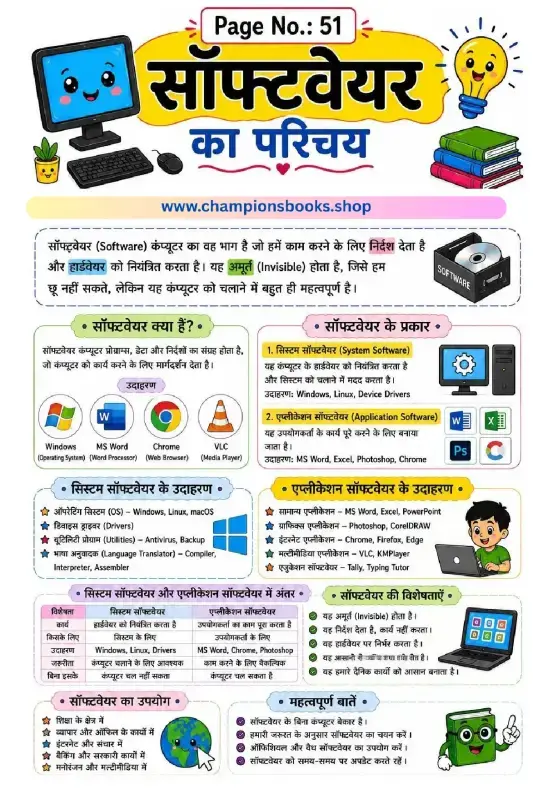
About this Worksheet Our Introduction to Computer Software Worksheet in Hindi is designed specifically for Grade 3 students to help them grasp the fundamental concepts of computer software. This beautifully illustrated, easy-to-understand study guide explains what software is, its primary functions, and how it differs from hardware. Written entirely in Hindi, it serves as an excellent resource for Hindi-medium schools and homeschooling parents teaching elementary computer science. With colorful visuals, clear diagrams, and a structured layout, this worksheet makes learning computer basics engaging and memorable. It breaks down complex technical terms into simple, digestible points that children can easily comprehend and apply. Learning Benefits Using this educational worksheet helps young learners develop key technical skills: Conceptual Clarity: Understands the core difference between system software and application software. Real-world Examples: Learn to identify common software programs like Windows, MS Word, Google Chrome, and VLC Media Player. Bilingual Familiarity: Connects Hindi computer terms with standard English terminology. Critical Thinking: Encourages students to distinguish between essential operating systems and user-specific applications. Key Concepts Covered This comprehensive worksheet covers vital topics in elementary computer education, including: What is Software? An introduction to the invisible instructions that guide computer hardware. System Software: Understanding operating systems (OS) like Windows and Linux, device drivers, and utility programs. Application Software: Exploring everyday tools like word processors, web browsers, and media players. Key Differences: A handy comparative table highlighting the differences in purpose, necessity, and examples. Uses of Software: How software impacts education, business, banking, and entertainment.

Learn System Software in Hindi - Types & Functions
About this System Software Worksheet This educational worksheet is specially designed for Grade 4 students to master the core concepts of System Software in Hindi. System software serves as the backbone of any computer system, managing hardware resources and enabling application software to function seamlessly. This highly visual guide uses simple Hindi explanations alongside English terminology to make complex computer science topics accessible and engaging for young learners. Key Topics Explored in the Worksheet What is System Software? Learn how it acts as a bridge between computer hardware and the user. The Five Core Types: Operating Systems: Such as Windows, macOS, Android, and Linux. Device Drivers: Including printer and graphics drivers that help hardware communicate with the OS. Language Translators: Compilers, interpreters, and assemblers that convert high-level code to machine language. Utility Programs: Tools like antivirus and disk cleanup that maintain system health. Firmware: Permanent software like BIOS and UEFI embedded in hardware. System vs. Application Software: A comparative look at the distinct roles of system-level programs versus user-focused apps like MS Word or Photoshop. Key Benefits: Understanding why system software is indispensable for computer operations, security, and performance. Why Use This Study Resource? This worksheet is perfect for classroom teaching, homeschooling, or self-study. It helps students build a strong foundational knowledge of computer architecture, improves their technical vocabulary, and fosters analytical skills by comparing different software types. With colorful illustrations and clear tables, learning about computers becomes both fun and effective!

Application Software in Hindi: Types & Uses Worksheet
About this Application Software Worksheet This educational worksheet is designed to help students learn all about Application Software (एप्लिकेशन सॉफ्टवेयर) in Hindi. It provides a clear, visual representation of what application software is, its major types, and practical real-life examples that children in Grade 4 can easily understand. Key Learning Topics Covered Definition of Application Software: Understand how these programs help perform specific daily tasks, studies, business, and communication. Types of Application Software: Learn about the five main categories: General Purpose, Special Purpose, Educational, Entertainment, and Communication Software. Popular Software Examples: Real-world examples including MS Word, Excel, PowerPoint, Google Chrome, Adobe Photoshop, and Tally Prime. Benefits and Features: Discover why application software is essential for saving time, improving accuracy, and increasing productivity. Learning Benefits for Students Using this worksheet, young learners can easily grasp fundamental computer science concepts. It is an excellent resource for teachers and parents to introduce: Visual associations with popular icons like WhatsApp, Zoom, and YouTube. Practical knowledge of where computer programs are used in daily life, such as in healthcare, business, and education. Critical thinking about how different software tools solve specific real-world problems. How to Use this Worksheet This guide is perfect for elementary school computer classes. Teachers can use it as a reference poster or study guide. Students can review the colorful illustrations to memorize the difference between system software and application software, understanding that application software runs on top of system software to fulfill user-specific needs.
Utility Software in Hindi - Types and Uses Worksheet
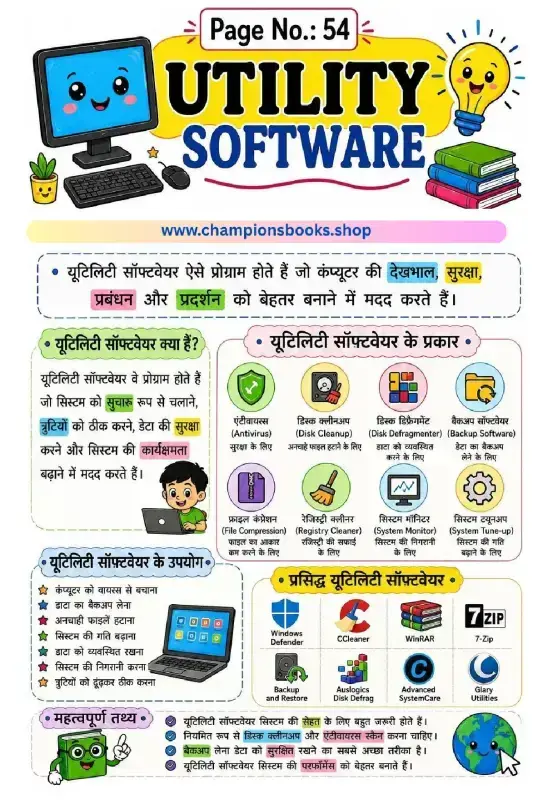
About this Worksheet This educational worksheet is designed to teach students about utility software in Hindi. Perfect for elementary school computer science classes, particularly Grade 4, this visually engaging guide helps young learners understand how computers are maintained, secured, and optimized. With colorful illustrations and easy-to-understand Hindi text, students can grasp fundamental computer concepts with ease. What is Utility Software? (यूटिलिटी सॉफ्टवेयर क्या है?) Utility software refers to system programs designed to help analyze, configure, optimize, or maintain a computer. They assist in keeping the computer system safe, clean, and running smoothly. Unlike application software, utility software focuses on how the computer infrastructure operates behind the scenes. Key Types of Utility Software Covered This worksheet introduces students to various essential utility tools, including: Antivirus (एंटीवायरस): Protects the computer system from harmful malware and viruses. Disk Cleanup (डिस्क क्लीनअप): Removes unnecessary files to free up valuable storage space. Disk Defragmenter (डिस्क डीफ़्रेग्मेंट): Organizes fragmented data on the hard drive for faster performance. Backup Software (बैकअप सॉफ्टवेयर): Helps create secure copies of important data to prevent accidental loss. File Compression (फ़ाइल कंप्रेशन): Reduces file sizes to save storage space (e.g., WinRAR, 7-Zip). Learning Benefits Helps children identify different types of system tools and their specific functions. Explains complex computer hardware and software maintenance concepts in simple, accessible Hindi. Encourages safe computer practices, such as running regular antivirus scans and performing data backups. Perfect for school homework, classroom activities, or self-study for young tech-savvy students.
Learn Firmware in Hindi Worksheet for Grade 5 Kids
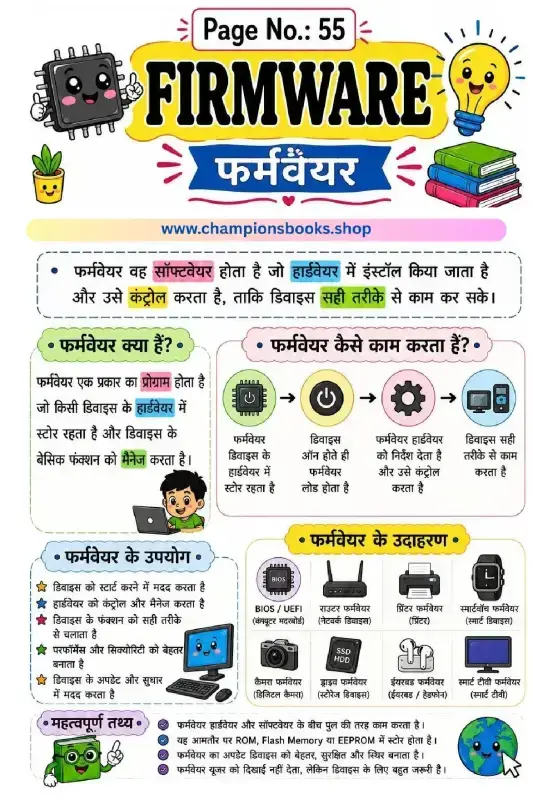
About this Worksheet: Understanding Firmware This beautifully illustrated Firmware in Hindi Worksheet is designed specifically for Grade 5 students to help them grasp the fundamental concepts of computer hardware and software integration. Written in clear, easy-to-understand Hindi, this worksheet breaks down the complex topic of firmware into digestible, visual segments that make learning computer science engaging and fun. Key Learning Topics Covered This educational infographic and worksheet covers essential computer science basics, including: What is Firmware? (फर्मवेयर क्या है?): A clear definition explaining that firmware is software installed directly into hardware to control and manage its basic functions. How Firmware Works (फर्मवेयर कैसे काम करता है?): A step-by-step visual flowchart showing how firmware loads when a device turns on and guides the hardware. Uses of Firmware (फर्मवेयर के उपयोग): Real-world applications such as starting devices, improving security, managing performance, and enabling system updates. Real-world Examples (फर्मवेयर के उदाहरण): Everyday devices using firmware, including BIOS/UEFI, routers, printers, smartwatches, digital cameras, SSDs, earbuds, and smart TVs. Important Facts (महत्वपूर्ण तथ्य): Crucial concepts like firmware acting as a bridge between hardware and software, and being stored in ROM, Flash Memory, or EEPROM. Benefits of using this Infographic By using this visual guide, young learners can easily bridge the gap between abstract computer concepts and tangible daily electronics. The use of colorful cartoon characters, clear icons, and structured Hindi text ensures that students retain key terms and understand the vital role firmware plays in modern technology. It is an excellent resource for teachers, parents, and elementary school students starting their digital literacy journey.
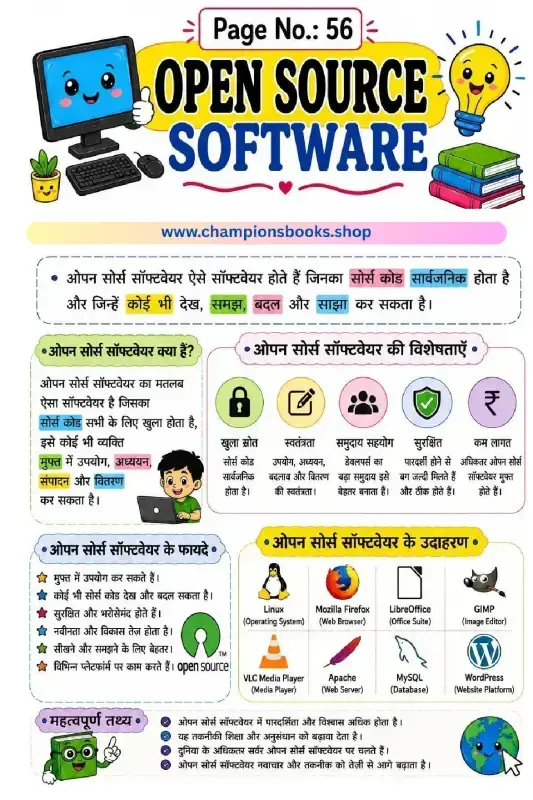
Open Source Software in Hindi Worksheet | Grade 5 Computer
About this Worksheet: Open Source Software in Hindi Introduce young learners to the world of technology with this engaging and educational worksheet on Open Source Software in Hindi. Designed specifically for Grade 5 students, this colorful study guide simplifies complex computer science concepts using simple Hindi language, vibrant illustrations, and relatable everyday examples. Key Learning Objectives What is Open Source Software? Understand the core definition (ओपन सोर्स सॉफ्टवेयर क्या है) and the concept of public source code. Key Features: Learn about the essential characteristics including freedom to modify, community collaboration, high security, and low cost. Key Benefits: Discover why open-source solutions are reliable, secure, and promote continuous innovation. Important Facts: Explore how open-source technology powers the majority of global servers and drives modern research. Real-World Examples Included This worksheet helps students connect theory to practice by highlighting popular open-source platforms they might already use: Linux: The powerful open-source operating system. Mozilla Firefox: A secure and widely-used web browser. LibreOffice: A free alternative for office productivity. VLC Media Player: The popular multi-format media player. WordPress: The world's leading website creation platform. Why Teachers and Parents Love It This worksheet serves as an excellent resource for bilingual classrooms, homeschooling, and computer science study groups. By presenting technical knowledge in Hindi, it ensures conceptual clarity, boosts technical vocabulary, and fosters a deeper curiosity about how software and the internet work.
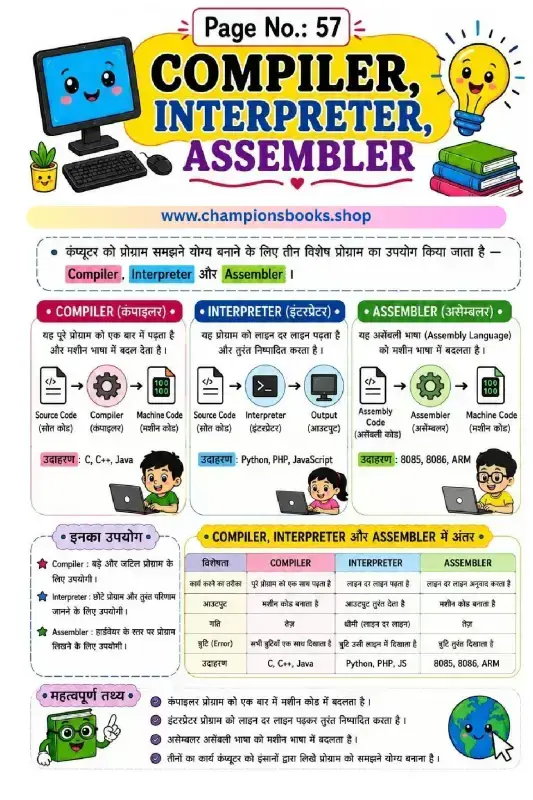
Compiler Interpreter and Assembler in Hindi - Grade 5
About this Worksheet This educational worksheet is designed to teach Grade 5 students the fundamental concepts of computer language translators in Hindi. It provides a clear, visual explanation of how a Compiler, Interpreter, and Assembler work to translate human-readable source code into machine code. With colorful illustrations and easy-to-understand Hindi text, kids can grasp complex programming and computer science concepts effortlessly. Key Concepts Covered Compiler (कंपाइलर): Explains how it reads the entire program at once and translates it into machine language (Examples: C, C++, Java). Interpreter (इंटरप्रेटर): Details how it reads and executes code line-by-line for instant results (Examples: Python, PHP, JavaScript). Assembler (असेम्बलर): Shows how assembly language is converted into machine code (Examples: 8085, 8086, ARM). Comparison Table: A handy reference comparing working methods, output, speed, and error detection. Learning Benefits Bilingual Understanding: Helps Hindi-medium students learn essential computer science terminology in both Hindi and English. Visual Flowcharts: Features engaging diagrams showing the translation process from source code to machine code. Analytical Skills: Encourages logical thinking by comparing how different translators handle errors and execution speeds.

Operating System Worksheet in Hindi for Grade 3 & 4
About this Operating System Worksheet in Hindi Introduce young learners to the core concepts of computer science with our engaging Operating System Worksheet in Hindi designed for Grade 3 students. This colorful and educational worksheet simplifies complex computer concepts, making it easy for children to understand how an operating system acts as the "manager" of a computer. Written in clear Hindi, it serves as an excellent resource for classrooms, homeschooling, and self-study. Key Learning Concepts Covered This comprehensive worksheet covers vital topics about operating systems, helping students build a strong foundation in computer literacy: Introduction to OS: Understands how an operating system coordinates between computer hardware and software. Functions of an OS: Explains key management tasks such as process management, memory management, file management, device control, and security. Types of Operating Systems: Introduces concepts like Single-User, Multi-User, Single-Tasking, and Multi-Tasking systems. Popular Examples: Features recognizable operating systems including Windows, Linux, Android, macOS, iOS, and DOS. Fun Facts: Includes interesting trivia like the first operating system (GM-NAA I/O) developed by IBM in 1956. Benefits of Using this Worksheet Our Operating System Worksheet in Hindi provides several educational benefits for primary school students: Bilingual Understanding: Helps Hindi-medium students grasp technical computer terms easily. Visual Learning: Bright illustrations and icons keep young minds engaged and improve retention. Curriculum Aligned: Perfectly aligned with elementary computer science curricula for Grade 3 and above.

Windows Operating System in Hindi Worksheet for Grade 3
About this Windows Operating System Worksheet Introduce young learners to the basics of computers with our engaging Windows Operating System in Hindi Worksheet. Specially designed for Grade 3 students, this colorful educational poster and worksheet provides a comprehensive introduction to Microsoft Windows, making complex concepts easy to understand in Hindi. It serves as an excellent resource for primary school teachers and parents looking to build strong foundational computer skills in children. What Students Will Learn This worksheet is packed with visual aids and simplified explanations covering key computer concepts: What is Windows? An easy-to-understand definition of an Operating System (ऑपरेटिंग सिस्टम) and how it bridges the gap between the user and computer hardware. Key Features of Windows: Highlights important features like a user-friendly interface, multitasking support, secure file management, and gaming capabilities. Evolution of Windows: A visual timeline of major versions from Windows XP (2001) all the way to Windows 11 (2021). Core Components: Introduction to essential parts of the interface, including the Desktop, Start Menu, Taskbar, Icons, and Recycle Bin. Learning Benefits for Grade 3 Students Bilingual Learning: Helps Hindi-medium students grasp technical computer terms alongside their English equivalents. Visual Memory Aids: Bright illustrations of computers, operating system logos, and icons keep children engaged and improve retention. Practical Knowledge: Prepares kids for real-world computer usage by explaining practical applications like document creation, internet browsing, and file organization. Download and use this worksheet to make computer science lessons fun and interactive. Whether for classroom teaching or home study, this guide is the perfect stepping stone for future digital literacy!
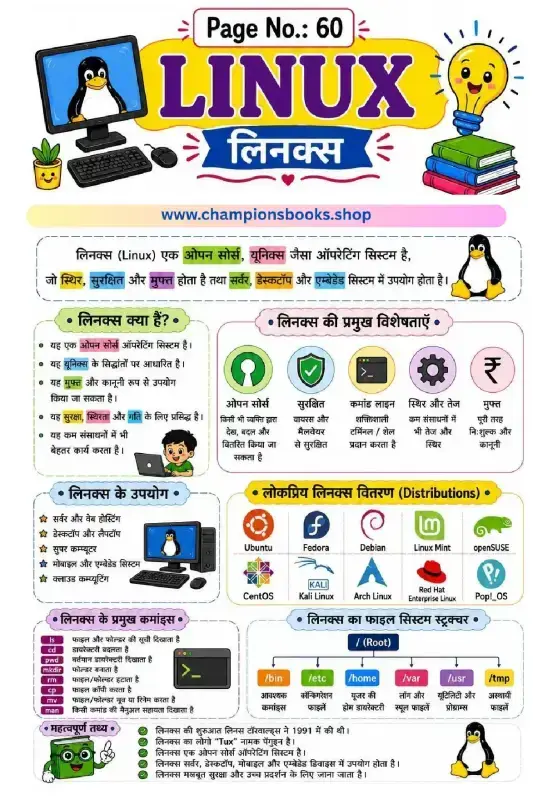
Linux Basics Worksheet in Hindi for School Students
About this Worksheet Introduce your students to the world of open-source operating systems with our comprehensive Linux Basics Worksheet in Hindi. Designed specifically for middle school students (Grade 6 to 8), this visually engaging study guide simplifies complex computer science concepts. It provides a clear, bilingual foundation for learning one of the world's most powerful operating systems, complete with illustrations and easy-to-understand Hindi explanations. What This Worksheet Covers This detailed educational resource covers all the essential aspects of the Linux operating system, making it an excellent teaching aid or self-study guide: What is Linux? An introduction to its open-source nature, security, stability, and Unix-based architecture. Key Features of Linux: Visual breakdown of open-source benefits, command-line interface, security, and cost-free usage. Popular Linux Distributions: A colorful chart featuring well-known distros like Ubuntu, Fedora, Debian, Kali Linux, and Red Hat. Basic Linux Commands: A quick-reference table for essential commands like ls, cd, pwd, mkdir, and more. File System Structure: An easy-to-follow diagram explaining the root directory (/) and its subfolders like /bin, /etc, and /home. Learning Benefits By using this worksheet, students will gain valuable IT skills and knowledge, including: Understanding the difference between proprietary and open-source software. Getting comfortable with the command-line interface (CLI) and basic terminal commands. Developing a conceptual understanding of directory trees and file structures. Learning interesting historical facts, such as the origin of Linux by Linus Torvalds and its mascot, Tux.

Learn Unix Operating System in Hindi - Features & Commands
About this Unix Worksheet in Hindi This educational worksheet provides a comprehensive and easy-to-understand introduction to the Unix Operating System in Hindi. Specially designed for middle school students, this colorful visual guide covers the core concepts, historical background, key features, and basic commands of UNIX to help students build a strong foundation in computer science and operating systems. Key Learning Benefits and Features Students will explore the fundamental architecture of UNIX through interactive visual blocks: What is UNIX? Learn about its origin in 1969 by Ken Thompson and Dennis Ritchie, and how it was uniquely written in the C programming language. Core Features: Understand critical operating system concepts such as Multiuser capabilities, Multitasking, high Security, Portability, and system Stability. Real-world Applications: Discover how UNIX powers web servers, banking and financial systems, scientific research institutes, and cloud computing platforms. Important Unix Commands: Get familiar with essential command-line tools including ls (list), cd (change directory), pwd (print working directory), mkdir (make directory), and file management commands like rm, cp, and mv. File System Structure: Visualise the hierarchical directory structure starting from the Root (/) directory down to /bin, /etc, /home, /var, /usr, and /tmp. Why Learn Unix? Unix is the foundational backbone of modern operating systems, including Linux and macOS. Learning about the Unix Operating System in Hindi helps young students easily grasp how enterprise-level servers and secure networks operate worldwide. This worksheet is an excellent resource for classroom teaching, self-study, and computer lab activities.

Android Operating System Worksheet in Hindi for Grade 4
About this Android Operating System Worksheet Introduce young learners to the world of mobile technology with our comprehensive Android Operating System Worksheet in Hindi. Designed specifically for Grade 4 students, this colorful study sheet simplifies complex computer science concepts into easy-to-understand Hindi. From learning what an operating system is to exploring the history of Android, this worksheet serves as an excellent educational guide for classrooms and home study. Key Learning Topics Covered This worksheet provides a structured breakdown of the Android platform, making it highly engaging for young minds: What is Android? An easy introduction to Google's open-source mobile operating system based on the Linux kernel. Key Features: Exploring the Google Play Store, customization options, multi-tasking abilities, and security features. Uses of Android: How Android is used in smartphones, tablets, gaming, online learning, and social media. Android Version History: A fun visual timeline tracking versions from Cupcake (1.5) to Android Q (10.0). Basic Architecture: A simple look at applications, runtime environments, libraries, and the Linux Kernel. Benefits for Grade 4 Students Using this worksheet helps students build a strong foundation in modern technology. By studying the Android Operating System Worksheet in Hindi, students will: Enhance their technical vocabulary in both Hindi and English. Understand how everyday devices like smartphones and tablets function. Develop critical thinking and logical reasoning skills related to computer science. Enjoy learning through vibrant illustrations and structured, bite-sized information.

Functions of Operating System Worksheet for Grade 5
About this Worksheet This educational worksheet is designed to help Grade 5 students easily understand the core functions of operating system (OS). Presented in a bilingual Hindi and English format, it simplifies complex computer science concepts into clear, digestible points. An operating system acts as the vital bridge between computer hardware and the user, and this chart visually breaks down exactly how it manages your computer's resources. 12 Key Functions of an Operating System This worksheet covers twelve essential roles that an OS performs to keep computers running smoothly: Process Management: Creating, scheduling, running, and stopping active programs. Memory Management: Allocating primary memory to different running programs. File Management: Creating, renaming, copying, and deleting files and folders. Device Management: Controlling input and output devices like keyboards, mice, and printers. Storage Management: Managing secondary storage space on hard disks. Security & Protection: Safeguarding data and blocking unauthorized users. User Interface: Providing an interactive platform for users to communicate with the system. Resource Allocation: Distributing CPU power, memory, and devices to tasks. Job Accounting: Keeping track of system usage and user activity. Error Detection: Detecting and handling hardware or software errors. Communication Support: Facilitating networking and communication between multiple users. Performance Monitoring: Tracking system performance to ensure efficient operations. Learning Benefits By studying this functions of operating system worksheet, students will: Grasp fundamental computer hardware and software interactions. Improve bilingual technical vocabulary in both English and Hindi. Develop a strong foundation for future computer science and IT studies.

Computer File Management Worksheet for Grade 4 Students
About this Worksheet This comprehensive computer file management worksheet is designed for Grade 4 students to learn the essential basics of organizing and managing files on a computer. Presented in an easy-to-understand bilingual format (Hindi and English), this worksheet covers everything from creating files to organizing them in folders. It serves as an excellent resource for young learners to build solid foundational computer literacy skills. Core Concepts Covered This worksheet provides clear explanations and visual aids for several fundamental computer science topics: File Operations: Step-by-step guide to essential tasks like Create, Rename, Copy, Move, Delete, Search, Open, and Save. Structure of a File: Understanding file attributes including Name, Type/Extension, Location, Size, and Date & Time. Types of Files: Visual identification of common file formats such as Text (.txt), Documents (.docx), Spreadsheets (.xlsx), Presentations (.pptx), PDFs, Media, and Compressed files. Folder Organization: How to organize files systematically using folders like Documents, Pictures, Music, Videos, and Downloads. File Naming Rules: Crucial guidelines for naming files, including character limits and forbidden characters. Learning Benefits Helps students develop strong digital literacy and organizational skills early on. Improves efficiency in searching and retrieving digital documents. Bilingual support makes complex computer terminology easy to grasp for Hindi-medium and ESL students. Perfect for classroom teaching, homework assignments, or self-paced learning at home.

Computer Booting Process Steps Chart and Worksheet
About the Computer Booting Process Chart This educational chart is designed to help students understand the fundamental computer booting process in an engaging, visual format. Presented in both Hindi and English, this worksheet simplifies complex computer science concepts for young learners, making it an excellent resource for classroom teaching or self-study. Key Learning Concepts Covered This comprehensive guide covers all essential aspects of how a computer starts up, including: 8 Steps of Booting: Step-by-step breakdown from Power On, POST (Power On Self Test), BIOS/UEFI Initialization, Boot Device Selection, loading the Boot Record, loading the Boot Loader, loading the OS Kernel, to the final OS Start and Login. Types of Booting: Clear definitions of Cold Boot, Warm Boot, and Hot Boot. Key Components: Explanation of critical elements like BIOS/UEFI, MBR/GPT, Boot Loader, Kernel, and Drivers. Boot Order: Understanding how the computer searches for bootable drives (HDD/SSD, USB, CD/DVD, Network). Visual Flowchart: An easy-to-follow flowchart detailing the exact sequence of the booting cycle. Educational Benefits for Students Bilingual Learning: Supports both English and Hindi mediums, ensuring clear conceptual understanding. Foundation in Tech: Introduces essential operating system and hardware interaction concepts early. Problem-Solving Skills: Helps students understand system startup diagnostics like POST, aiding in basic troubleshooting knowledge.

Learn MS Office Introduction in Hindi Worksheet for Kids
About this MS Office Introduction Worksheet This educational worksheet is designed to introduce young students to the basics of Microsoft Office. Written in simple Hindi with colorful illustrations, the MS Office Introduction in Hindi Worksheet helps kids understand the fundamental tools used in everyday computer tasks. It is perfect for Grade 3 to Grade 5 students who are starting their digital learning journey and need clear, visual study guides. Key Topics Covered in the Worksheet What is MS Office? A simple explanation of the office suite and how it simplifies school and business tasks. Core MS Office Programs: Introduces the main applications like MS Word (for documents), MS Excel (for spreadsheets), MS PowerPoint (for presentations), Outlook (for emails), and OneNote (for notes). Benefits of MS Office: Highlights how these tools help save time, organize data securely, and create professional-looking documents. Types of MS Office: Explains the difference between the Standalone offline version and the cloud-based Microsoft 365 subscription. Important File Extensions: Teaches kids about common formats such as .docx, .xlsx, .pptx, and .pdf. Learning Benefits for Kids By studying this interactive Hindi worksheet, students will: Build a strong foundation in essential computer literacy. Easily recognize standard software icons and understand their primary functions. Learn how technology simplifies academic and professional work. Get ready for school computer lab practical exams and classroom projects.

MS Word Worksheet in Hindi: Learn Basics & Shortcuts
About this MS Word Worksheet in Hindi Introduce young learners to the basics of word processing with our engaging and colorful MS Word Worksheet in Hindi. Designed specifically for primary school students, this educational resource simplifies complex computer concepts, making digital literacy fun, visual, and easy to grasp in Hindi. Key Learning Features This comprehensive study guide covers all the essential aspects of Microsoft Word, helping students build a strong foundational knowledge of computer systems: Introduction to MS Word: A simple, bilingual definition explaining how Microsoft Word is used to create, edit, format, and print documents. Features of MS Word: Highlights key capabilities like font customization, table insertion, spelling check, and document saving. Real-World Uses: Colorful illustrations showing how MS Word is used to write letters, create resumes, take notes, and make reports. Main Parts of MS Word: A clear visual breakdown of the interface, including the Title Bar, Ribbon, Quick Access Toolbar, and Status Bar. File Operations: Step-by-step icons explaining how to create a New file, Open, Save, Edit, and Print. Essential Keyboard Shortcuts Included Learning shortcuts helps kids build typing speed and computer confidence. This worksheet features a handy shortcut reference guide: Ctrl + N & Ctrl + O: Create a New document and Open an existing file. Ctrl + S & Ctrl + P: Save your work and Print documents instantly. Ctrl + C, V, X, Z: Master the essential editing commands for Copy, Paste, Cut, and Undo. Why Choose This Worksheet? With its vibrant illustrations, child-friendly layout, and simple Hindi explanations, this worksheet is perfect for elementary classrooms, homeschooling, and computer lab activities. It bridges the gap between theory and practical computer skills seamlessly.
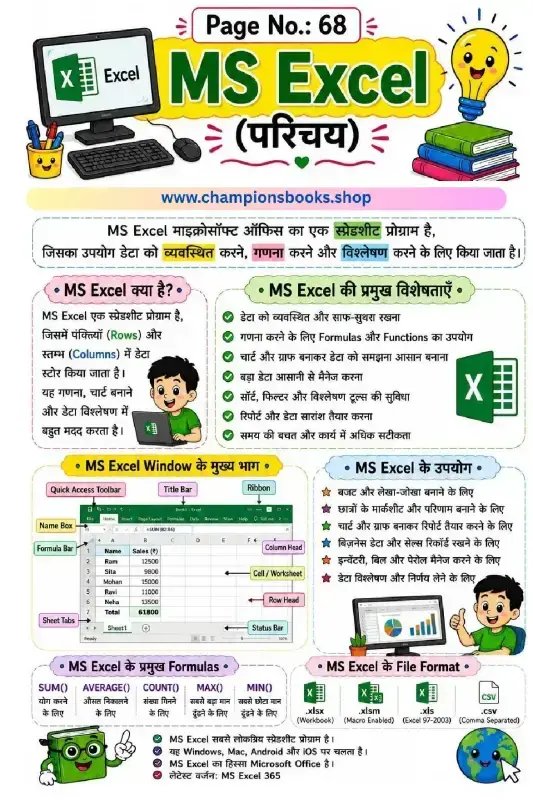
MS Excel Introduction in Hindi Worksheet for Students
About this MS Excel Introduction in Hindi Worksheet Introduce young learners to the powerful world of spreadsheets with our comprehensive MS Excel Introduction in Hindi worksheet. Designed specifically for primary and middle school students, this visual guide breaks down complex computer concepts into easy-to-understand Hindi and English explanations. It serves as an excellent resource for computer lab sessions, classroom teaching, or home study. Key Learning Benefits This worksheet helps students build a strong foundation in digital literacy. By engaging with this material, students will learn: What is MS Excel: Understand rows, columns, and how data is stored in a spreadsheet program. Essential Features: Learn how Excel helps in organizing data, performing calculations, and creating charts. MS Excel Window Components: Identify key parts of the interface, including the Quick Access Toolbar, Formula Bar, Name Box, Ribbon, and Sheet Tabs. Practical Uses: Discover real-world applications of Excel, such as making budgets, student report cards, and managing business records. Basic Formulas: Get introduced to primary formulas like SUM(), AVERAGE(), COUNT(), MAX(), and MIN(). File Formats: Understand common extensions like .xlsx, .xlsm, .xls, and .csv. Why Use Our Computer Worksheets? Visual learning aids make abstract computer science topics concrete and memorable. With colorful illustrations, clear labeling, and bilingual terms, this worksheet ensures that students not only memorize terms but truly comprehend how to navigate and utilize Microsoft Excel effectively. Download this worksheet today to boost your child's computer proficiency and analytical skills!
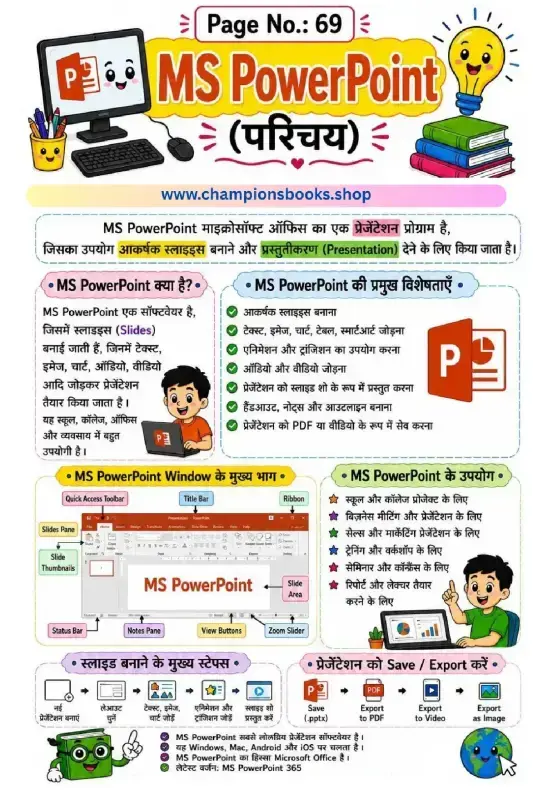
MS PowerPoint Worksheet in Hindi | Kids Computer Notes
About this Worksheet This colorful and engaging MS PowerPoint Worksheet in Hindi is designed to introduce young students to the world of digital presentations. Ideal for elementary school kids, this worksheet simplifies complex computer concepts into easy-to-understand Hindi, complete with vibrant illustrations. Whether for school projects or personal learning, mastering Microsoft PowerPoint helps children express their ideas creatively and build confidence in public speaking and presentation skills. Students will learn the fundamental purpose of MS PowerPoint as a presentation program used to create eye-catching slides. Key Learning Benefits Using this worksheet, kids can quickly grasp the basics of presentation software. It helps them build digital literacy and essential computer skills early on. Here are the key benefits: Visual Learning: A labeled diagram of the MS PowerPoint window makes it easy to identify components like the Ribbon, Slide Area, and Quick Access Toolbar. Step-by-Step Guidance: Clear visual steps show how to create, design, and run a slide show. Practical Applications: Explains real-world uses such as school projects, business meetings, and seminars. What Kids Will Learn This comprehensive study guide covers all the essentials of MS PowerPoint: Definition and Features: Understanding what PowerPoint is and its key features like adding text, images, charts, and animations. Window Components: Familiarization with Title Bar, Status Bar, Zoom Slider, and View Buttons. Exporting Options: How to save presentations in different formats like PPTX, PDF, Video, and Images. This worksheet is an excellent resource for parents and teachers looking to teach computer science basics in Hindi.
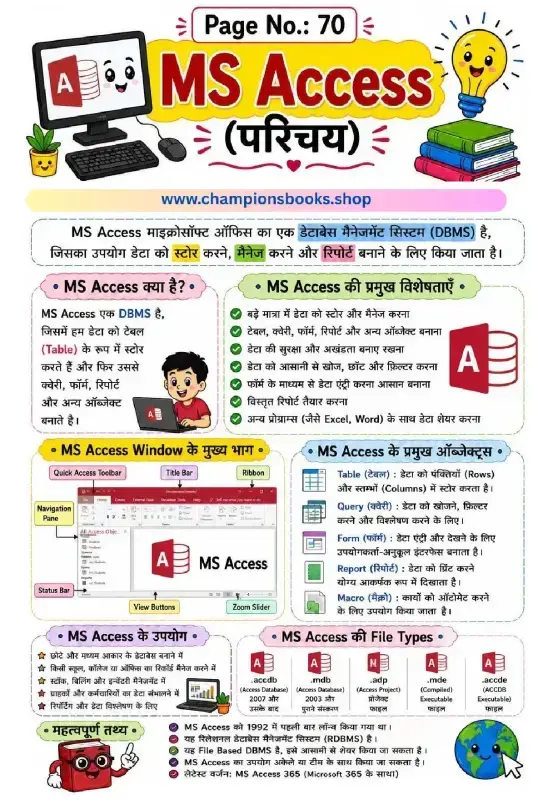
MS Access Introduction Worksheet in Hindi | Class 6 Computer
About this MS Access Worksheet This educational worksheet is designed to introduce Grade 6 students to the basics of MS Access (Microsoft Access) in Hindi. MS Access is a powerful Database Management System (DBMS) used to store, manage, and report data efficiently. This colorful and easy-to-understand study guide covers all the foundational concepts needed for school computer science curriculum. Key Learning Topics Covered What is MS Access: Understanding DBMS and how data is stored in tables, queries, forms, and reports. Key Features: Storing large datasets, ensuring data security, easy searching, and seamless integration with Excel and Word. MS Access Window Components: Visual identification of the Title Bar, Quick Access Toolbar, Ribbon, Navigation Pane, and Status Bar. Core Database Objects: Definitions of Tables (rows and columns), Queries (filtering), Forms (data entry), Reports (printable format), and Macros (automation). File Formats: Introduction to database file extensions like .accdb, .mdb, and .accde. Practical Uses of MS Access Creating and managing databases for small and medium-sized businesses. Maintaining student, teacher, and staff records in schools and colleges. Tracking stock, billing, and inventory management efficiently. Analyzing data and generating detailed reports for decision-making. Learning Benefits for Students By studying this MS Access Introduction Worksheet in Hindi, young learners will develop essential digital literacy and database management skills. They will learn how relational databases work, how to organize unstructured data, and understand the practical uses of databases in real-world environments. The visual layout and bilingual terminology make it highly effective for both classroom teaching and self-study.
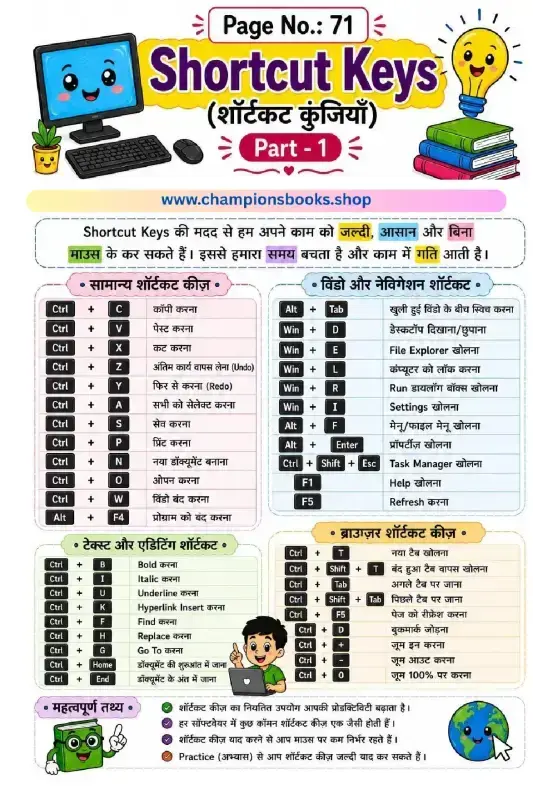
Computer Shortcut Keys Worksheet for Kids | Grade 3
About this Computer Shortcut Keys Worksheet Introduce young learners to the digital world with our comprehensive computer shortcut keys worksheet designed specifically for Grade 3 students. This colorful and engaging chart helps children understand how keyboard shortcuts make computer tasks faster, easier, and more efficient. With bilingual explanations in both Hindi and English, it serves as an excellent resource for bilingual classrooms and home learning. What's Covered in this Guide? This worksheet is divided into four highly practical categories to help kids easily categorize and memorize essential commands: General Shortcuts: Core commands like Copy (Ctrl+C), Paste (Ctrl+V), Undo (Ctrl+Z), and Save (Ctrl+S). Window & Navigation: Handy keys for switching windows (Alt+Tab) and locking the computer (Win+L). Text & Editing: Simple formatting shortcuts such as Bold (Ctrl+B), Italic (Ctrl+I), and Underline (Ctrl+U). Browser Shortcuts: Basic web navigation like opening a new tab (Ctrl+T) and zooming in/out. Key Learning Benefits Learning keyboard shortcuts early offers numerous cognitive and practical advantages for young students: Boosts Productivity: Helps students complete computer-based assignments much quicker. Reduces Mouse Dependency: Promotes a more professional, keyboard-centric approach to computer literacy. Enhances Memory: Memorizing key combinations exercises cognitive recall and fine motor skills.
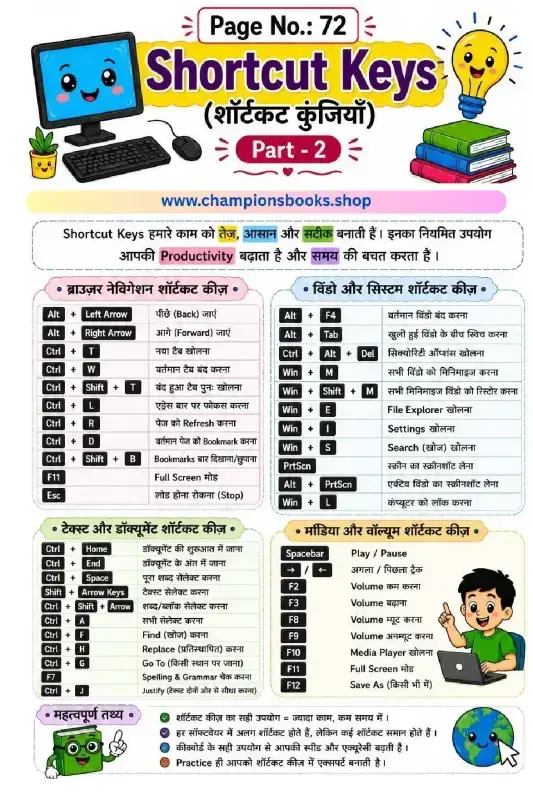
Computer Shortcut Keys Worksheet: Kids Keyboard Guide
About this Worksheet Introduce young learners to the essential world of technology with our interactive computer shortcut keys worksheet. Designed specifically for elementary students, this colorful, bilingual (Hindi and English) guide helps children grasp fundamental keyboard commands easily. Learning these shortcuts early builds confidence, boosts typing speed, and improves overall productivity when using computers for schoolwork or creative projects. Our computer shortcut keys worksheet is the perfect resource for teachers and parents looking to introduce basic computer science concepts. With bright, engaging illustrations and a clear layout, students will stay motivated as they practice these essential digital skills. Key Learning Sections This comprehensive worksheet is divided into four easy-to-understand categories: Browser Navigation Shortcuts: Learn how to move back and forward, open or close tabs, and refresh pages effortlessly. Window & System Shortcuts: Master basic system controls like minimizing windows, opening file explorer, searching, and taking screenshots. Text & Document Shortcuts: Essential commands for selecting text, finding words, and navigating documents quickly. Media & Volume Shortcuts: Fun and practical keys to play, pause, and adjust volume settings instantly. Learning Benefits Using a computer shortcut keys worksheet offers several educational advantages: Enhances Computer Literacy: Familiarizes students with the physical keyboard and digital navigation. Improves Efficiency: Teaches kids how to perform tasks faster, saving time during school assignments. Bilingual Learning: Clear explanations in both Hindi and English make it highly accessible for diverse learners. Encourages Independent Learning: Empowers students to navigate computers confidently on their own.